
Take the tour

Welcome to TEKTUNE!
This is a quick tour of what your shop gets - the same screens your team would use. It takes about three minutes.
- One connected system for the back of your shop: team chat, loaners, inspections, tools, time off and more.
- It runs alongside your shop management system - and pairs with Tekmetric if you use it.
- Use Next and Back (or your arrow keys) to move through it.
Task board
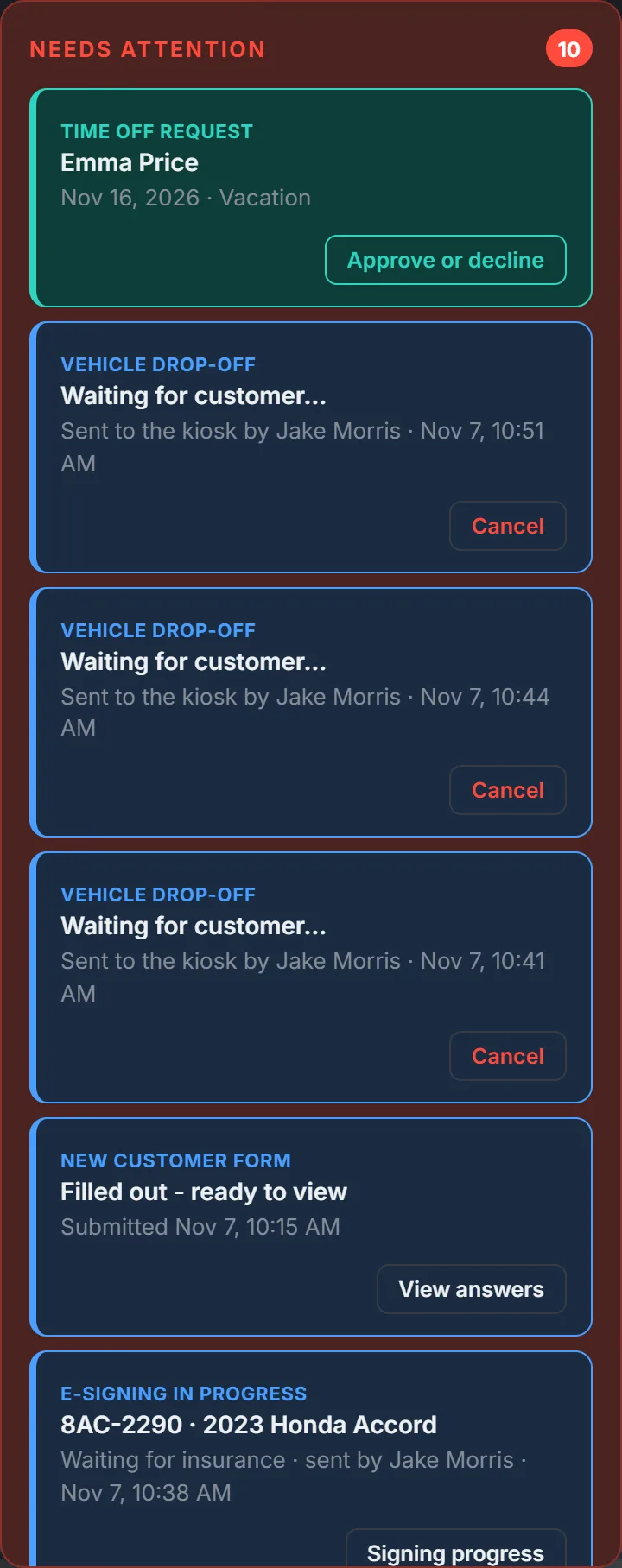
Everything that needs doing today, in one place everyone can see - on the shop computer, the wall TV and every phone.
- Shop tasks go in Needs Attention - a drawer on the side of every screen - for anyone to grab, and add up points when they're done.
- The same list brings what needs someone now: a form a customer just filled in, a rental agreement being signed, a time off request to decide, training that's due, a request from your website.
- Daily tasks someone missed turn more urgent each day they're skipped.
- Loaners coming back from a rental show up as inspection tasks automatically, and a problem a customer reports becomes a vehicle concern for a tech.
- Daily tasks reset every morning, on the days your shop is open.
- A weekly leaderboard, with the winner announced automatically - plus a weekly and monthly points goal for each person, and their own points stats and records.
Connects to Loaner fleet & sign-outFormsTime offTrainingShop websiteShop Hours


Message Center
Keep shop conversations out of personal text messages. Message Center is the chat your whole team shares - on the shop computer, every phone and the desktop app for Windows and Mac.
- Direct messages and group chats, grouped by day, with read receipts and "... is typing".
- Reply to a message and the conversation opens beside the chat; react with any emoji - your favorites come first.
- Type @ to mention someone, and paste or drag photos straight in - several at once.
- Mute a chat, mark it unread, search inside it, forward a message or save it for later.
- Announcements to the whole shop, with polls - including ranked-choice votes.
- Assignments hand someone a job - once, every day or every week - and tell you if it's late.
Connects to Tekmetric integrationDesktop app for Windows and MacTime offTraining


Tekmetric integration
Use Tekmetric? Connect it once and every repair order flows into TEKTUNE as it changes - and into the parts of your shop that need it.
- Repair orders: every RO arrives live, grouped by your shop's own Tekmetric status tags.
- RO links: any RO number in a chat or a task turns into an orange tag - hover for the customer, status, keytag and their loaner, click to open it in Tekmetric.
- Quality control: an RO moved to Quality Control adds a road-test task on its own, naming who moved it.
- Loaners: a car in for service gets a button to its repair order, and every repair order for it lands in its history.
- Vehicle concerns: no repair order yet? Add the RO number later, right on the car's card.
- Technicians: tie each Tekmetric technician to the employee it belongs to, so names show everywhere.
Optional - TEKTUNE works on its own. Connecting Tekmetric takes one link pasted into Tekmetric.
Connects to Message CenterTask boardLoaner fleet & sign-outRental car history & notes

Shop Hours
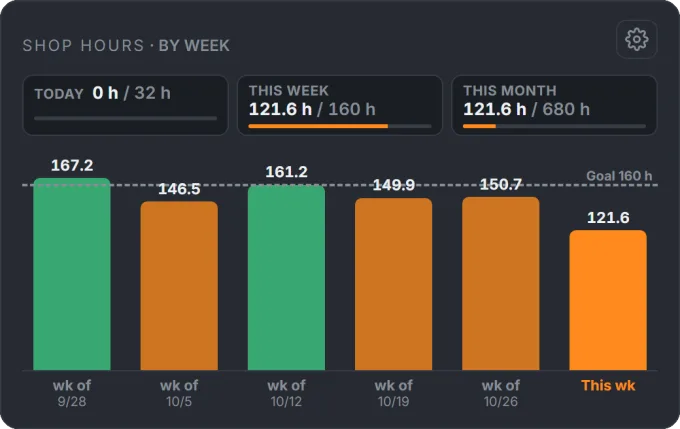
See the labor hours your shop produced today, this week and this month - right on the board, against the goals you set.
- Each morning, a card in Needs Attention asks your Foreman (or whoever you choose) for yesterday's hours - per technician or one shop total.
- A bar for every day of the week (or the last weeks or months), with your daily goal as a line.
- Every week and month is kept - look back a year at a time, and print it.
- Technicians can see their own hours on their profile - never anyone else's.
- Each technician gets their own stats: this week, month and year against their averages, records, streaks, and 38 hours achievements - plus a Points tab with goals, records and 28 more, like weekly and monthly leader. TEKTUNE messages them when they earn one, during work hours.
- Days the shop is closed and paid holidays are left out, and every change is in the edit log.
Connects to Task boardMessage Center

Desktop app for Windows and Mac
The TEKTUNE Message Center app keeps chat one click away on every shop computer - Windows PCs and Macs alike - with no browser tab to lose.
- One app for Windows and Mac: click Pop Out in Message Center to install it, and it signs in with your TEKTUNE account.
- New messages pop up as Windows or Mac notifications, with an unread count on the app's icon.
- Message Center in its own small window that stays on top - drop or paste photos right in; links open in your browser.
- It keeps itself up to date on both - new versions install on their own.
Connects to Message Center

Loaner fleet & sign-out
See every loaner at a glance - ready, out with a customer, being inspected or in for service - with fuel, mileage and where it is.
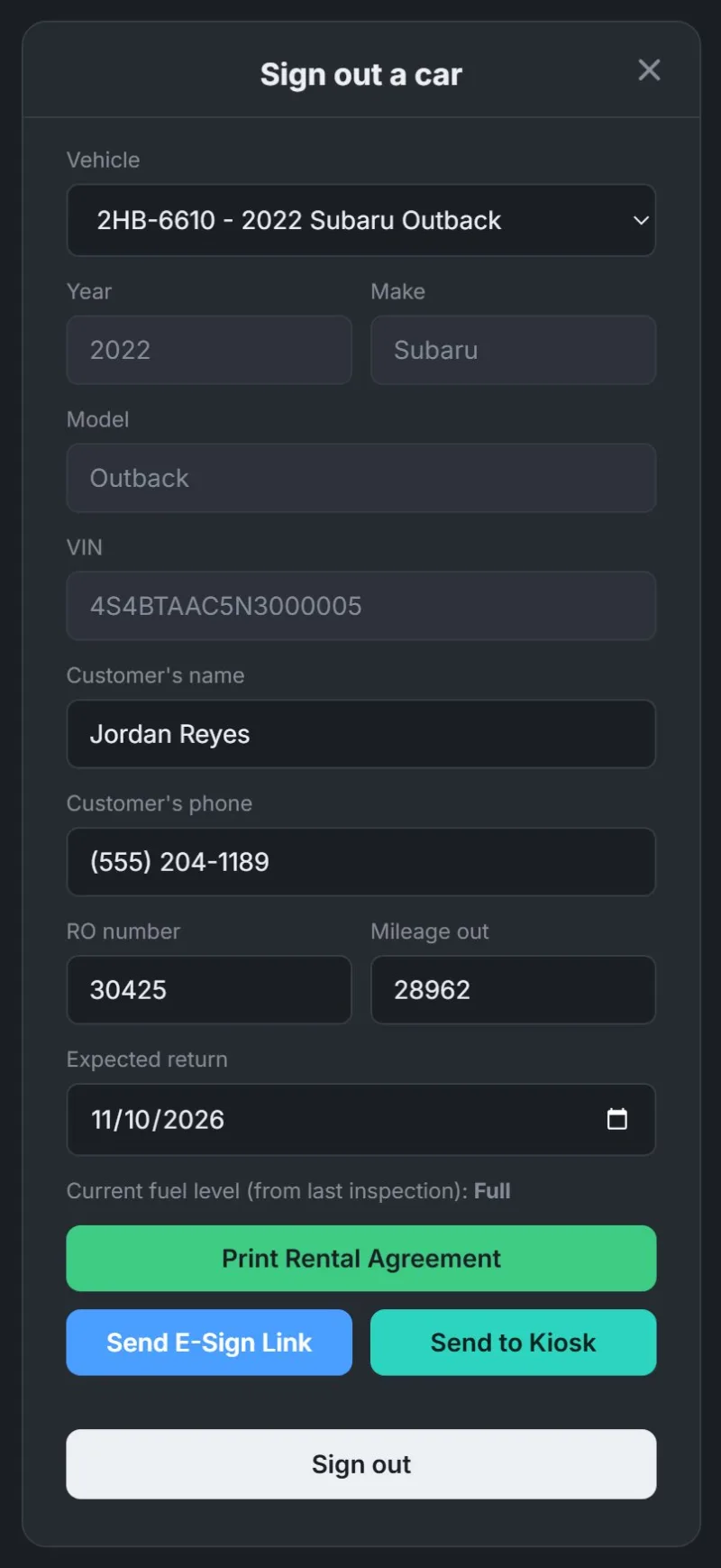
- Sign a car out with the customer, phone, RO number, mileage and return date.
- Print the rental agreement, send it for an electronic signature, or send it to the counter kiosk - or do it later from the car's Edit.
- Check the car in when it comes back; its inspection lands on the task board.
- Reserve cars ahead of time, and keep notes for the next person.
Connects to Electronic rental agreementsTEKTUNE Kiosk appRental turnover inspectionsRental car history & notesLive GPS trackingLockboxes
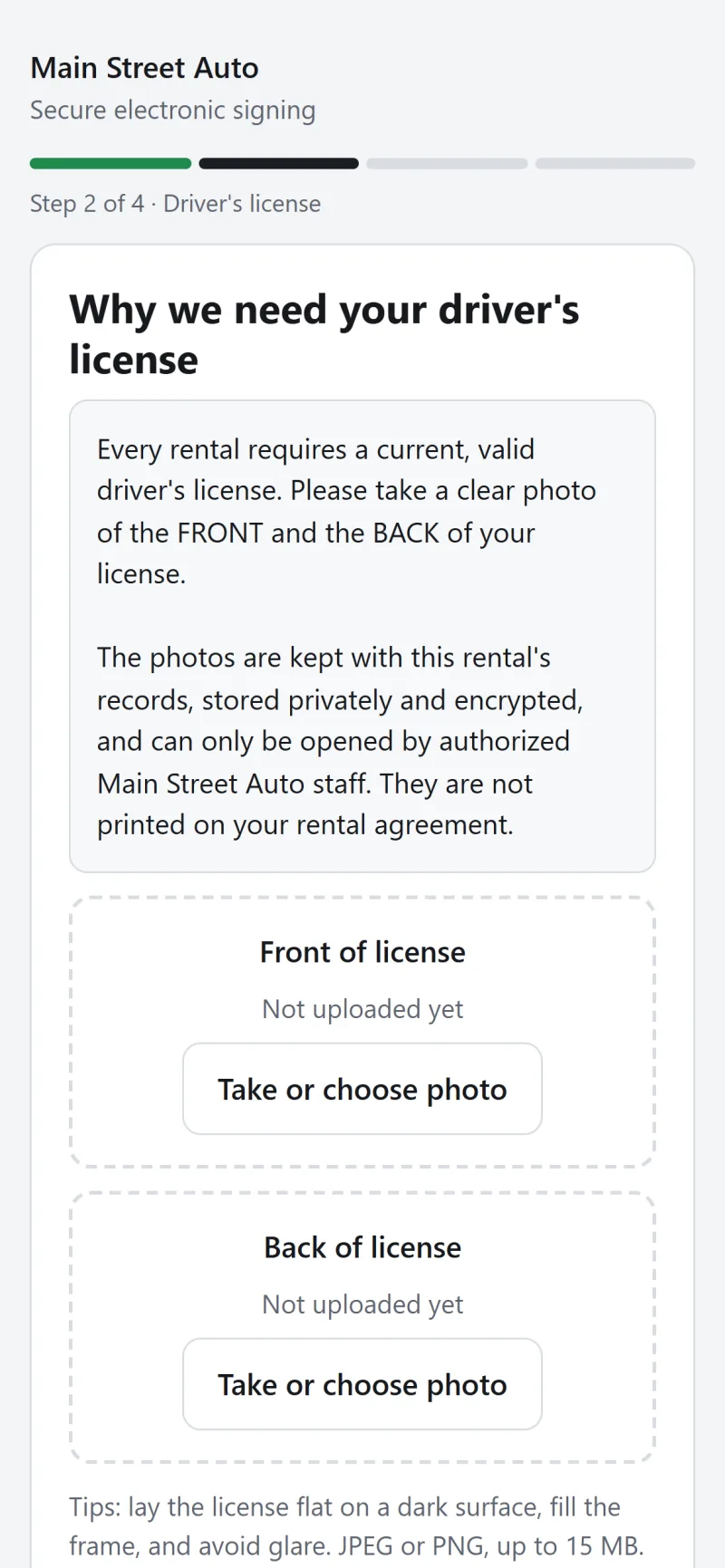
Electronic rental agreements
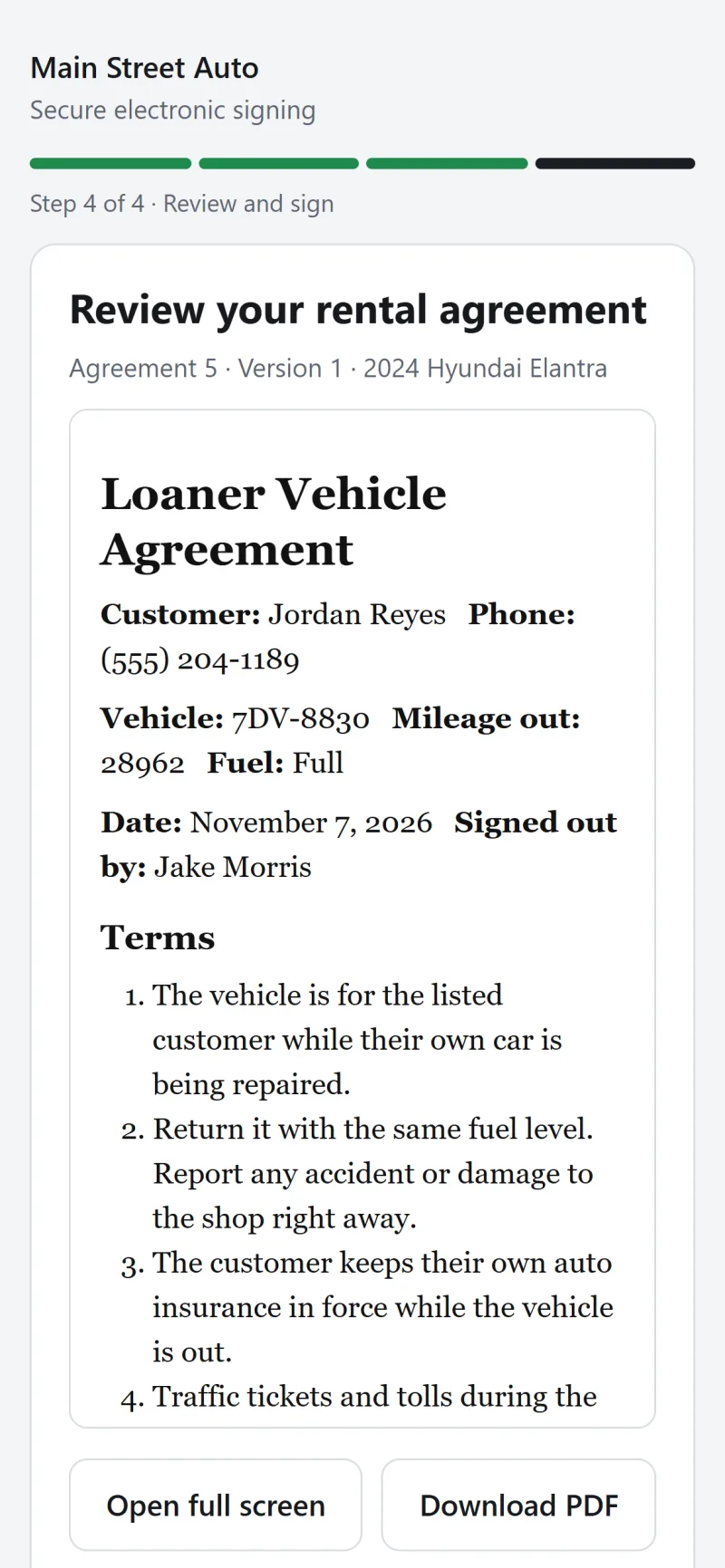
Send the rental agreement to the customer's phone - they sign before they arrive, or after hours.
- Text or email the customer a secure signing link, or hand it over.
- They photograph their license and insurance card, read the agreement and sign.
- You follow along on the board; when they sign, the car is signed out to them automatically.
- Assign a lockbox and they see its code on the last page - only after signing.
- A signed PDF with a signing certificate is kept with the car's history.
Connects to Loaner fleet & sign-outTEKTUNE Kiosk appLockboxesTask board

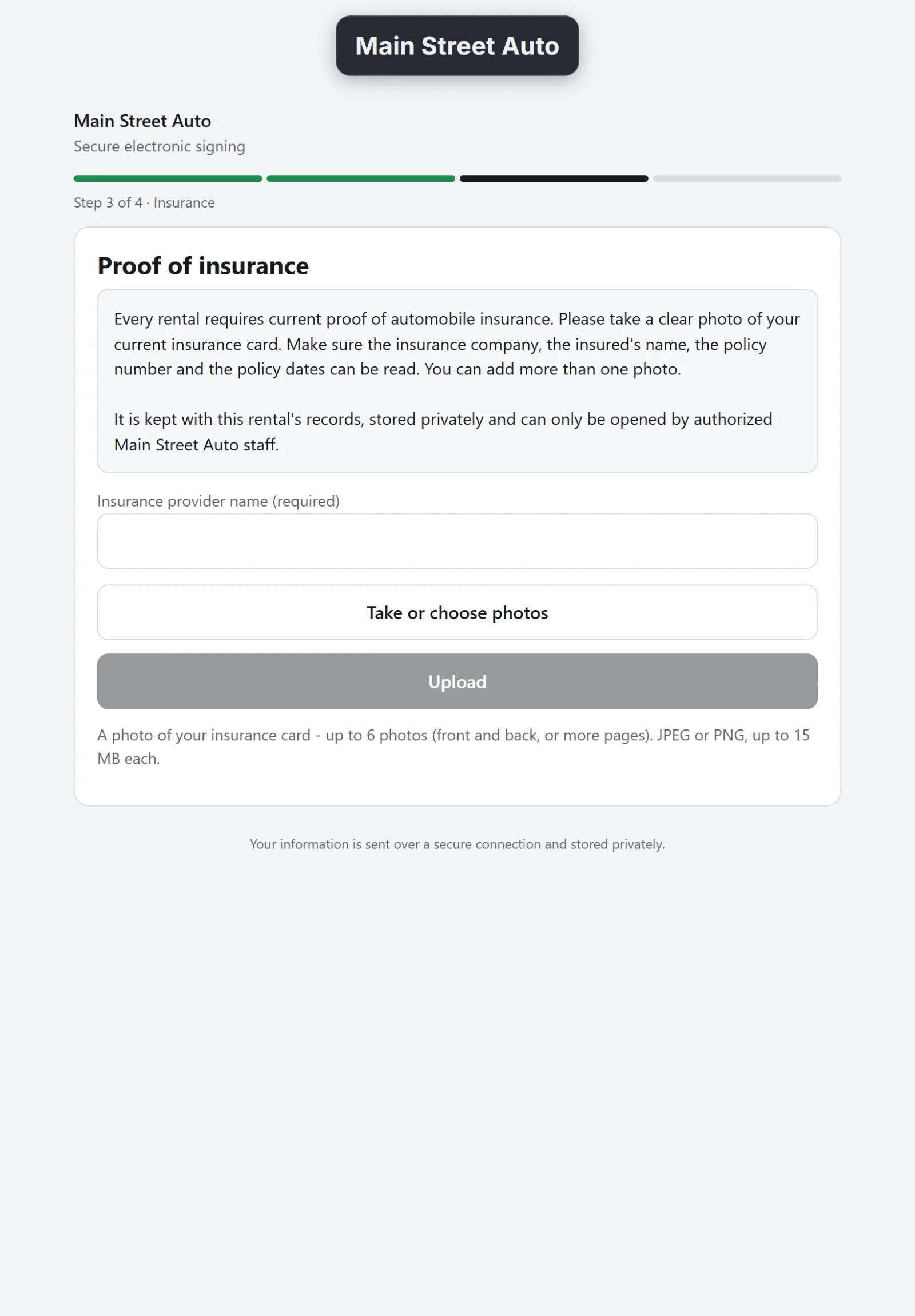
TEKTUNE Kiosk app
Put an iPad on the counter with the TEKTUNE Kiosk app. It shows your shop's logo until you send it something - no clipboard, no copier, no retyping.
- Set it up once on the shop's iPad or tablet; it signs in with its own PIN.
- Send a rental agreement to the kiosk and the customer signs with a finger - the car signs itself out.
- Send one of your shop's forms and customers fill it in - and sign it - right there.
- When they're done, the kiosk clears itself and goes back to your logo.
Connects to Electronic rental agreementsFormsLoaner fleet & sign-out

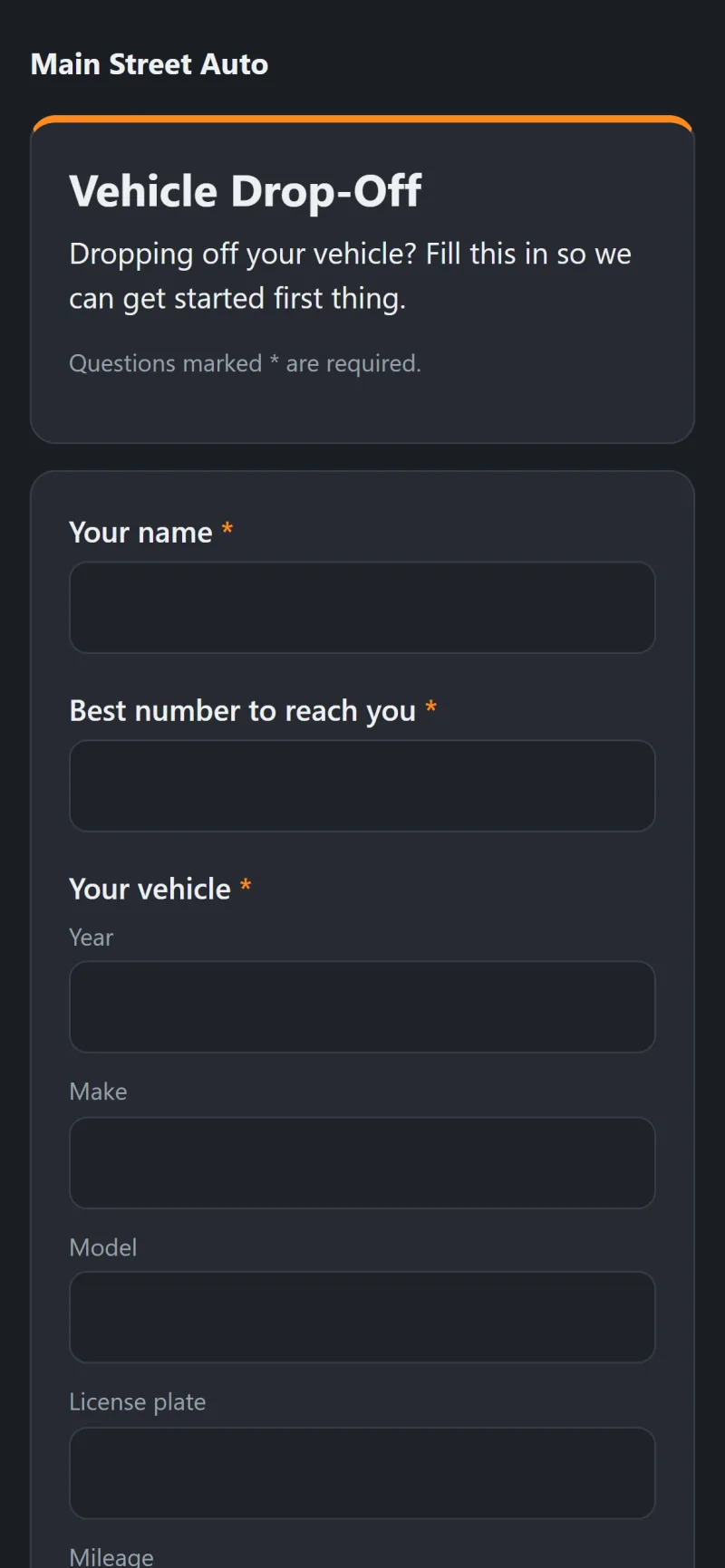
Forms
Build any form your shop uses - new customer, vehicle drop-off, repair authorization, pickup, feedback - and send it out in seconds.
- Start from a ready-made form or a blank one, and add any question: text, numbers, dates, choices, yes/no, the customer's vehicle, an agreement and a drawn signature.
- Text it to the customer, print it, or put it on the counter kiosk.
- Filled-in forms arrive on the task board; copy the answers into your shop system in a click.
Connects to Task boardTEKTUNE Kiosk app


Shop website
Build your shop's website right in TEKTUNE - no web designer, no separate website builder - and get its appointment requests on the board.
- Pick a look and drag in sections made for auto shops: services and prices, specials, reviews, an appointment request form, hours and a map, makes you service and more.
- Your shop's name, address, phone, hours and logo come in from TEKTUNE by themselves.
- Choose from eight menu bar styles, and use free icons and photos or your own - credits for the photos are added for you.
- Show your Google reviews live, and set how the site appears on Google and when it's shared.
- Connect to Site puts it online at a free address or your own domain, with https; Publish updates it.
- Appointment requests and questions from the website arrive in Needs Attention for your advisors.
Connects to Task board
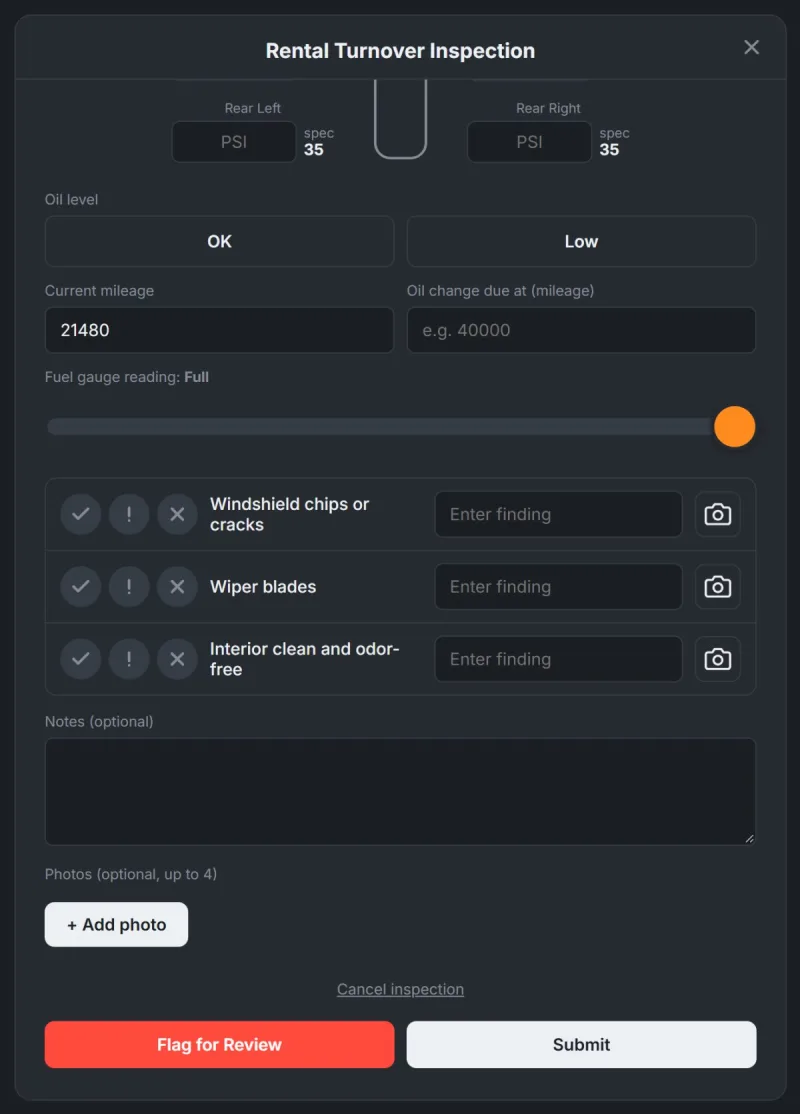
Rental turnover inspections
A guided turnover inspection makes sure every car goes back out clean, full and safe.
- Tap Start inspection - the car is claimed so nobody doubles up.
- Tire pressures next to the car's spec, oil, mileage, the fuel gauge and photos.
- Your own checklist items, each marked good, needs attention or needs it now - anything not good flags the car.
- Submit and the car is ready to rent - or flag it for repair.
Connects to Loaner fleet & sign-outTask boardRental car history & notes


Rental car history & notes
Every rental, inspection, service, repair and note for each car in your rental fleet - plus its repair orders from Tekmetric - on one timeline.
- The car at a glance: status, where it is, mileage and its Tekmetric links.
- Every rental, inspection, service and repair by month - filter it, search it, sort it, print it.
- Leave notes for the next person - new notes are flagged on the car's card.
- With Bouncie trackers, Location History shows every trip the car took.
Connects to Loaner fleet & sign-outRental turnover inspectionsTekmetric integrationLive GPS tracking

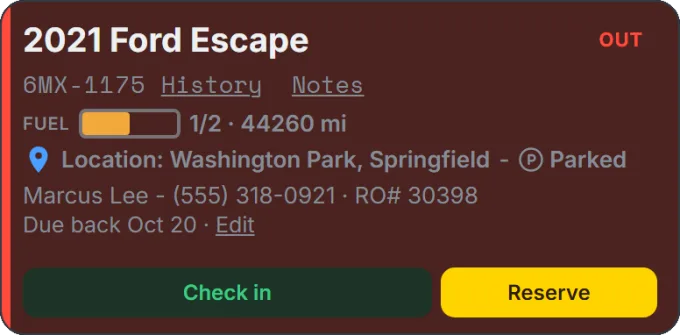
Live GPS tracking
Connect Bouncie trackers and see where your rental cars are, on a map, with a trip history for each one.
- Connect your Bouncie account and match each tracker to a car.
- See each car's location and whether it's moving, on the fleet board and a map.
- Review every trip, with a warning if a tracker was unplugged.
Requires Bouncie GPS trackers and a Bouncie account.
Connects to Loaner fleet & sign-outRental car history & notes


Special tool inventory
Every special tool - the shop's and each tech's own - with who has it right now.
- Add tools with a photo, part numbers, what they fit and where they live.
- Sign a tool out and back in - or just scan its barcode with a phone's camera or a scanner.
- Print barcode labels on standard label sheets, starting at any label on a part-used sheet.
- Ask to borrow someone's tool, report one missing or damaged, and keep a full sign-in/out log.
Connects to More than one shop


Time off
Employees request time off from their phone; the right manager approves it and everyone sees who's out.
- Pick days (or part of a day) and a reason, and see your remaining balance - days the shop is closed don't count.
- The request lands on the board for whoever approves it - their Foreman, Service Manager or a manager - who sees who else is off before deciding.
- The calendar shows who's out, paid holidays and shop events.
- Separate allowances - vacation, sick, bereavement or your own - each with its own balance.
- Print an approval sheet to sign, and subscribe to the calendar on a phone.
Connects to Task boardMessage CenterMore than one shop
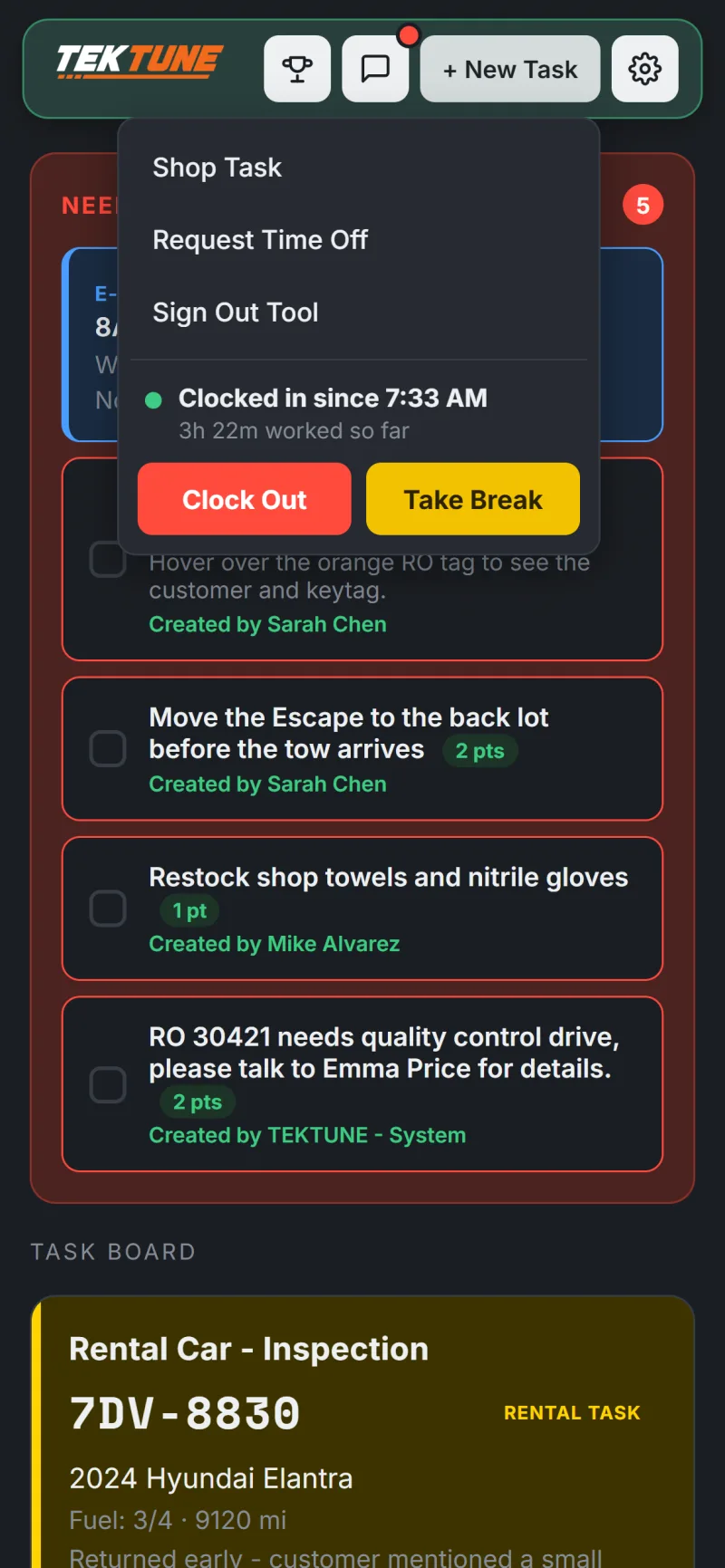

Time clock
Clock in, take breaks and clock out in one tap - with a location check so punches only happen at the shop.
- Clock in and out, and start and end breaks, from any phone.
- Each punch is checked against a circle around your shop (250 feet by default).
- Managers see time cards by week and who's on the clock now - and print time cards with signature lines.
- Fix or add punches when someone forgets - every change is logged.
Connects to Your team, your rulesReports & printouts


Training
Your shop's training in one place: new employee onboarding, in-house training and the employee manual.
- Courses made of lessons, each with an optional quiz.
- Start from a ready-made onboarding course or employee manual, or write your own.
- Assign a course to people - or to everyone new - and it shows on their board until it's done.
- The shop manual ends with everyone signing that they've read it; change it later and people only read the new parts.
- Download a course, or upload one - TEKTUNE reads standard course files (Common Cartridge and SCORM).
- Share courses with other TEKTUNE shops in the training library, and copy theirs.
- Every course and sign-off is listed on each person's profile.
Connects to Task boardMessage CenterMore than one shop

Reports & printouts
Weekly numbers for managers, a friendly competition for everyone else, and a printout of anything you need to file.
- Inspections and tasks by employee for the week.
- A weekly points leaderboard, with the winner announced automatically.
- Print any report, time card, history or list as a plain table - pick the dates first.
Connects to Task boardTime clock
Lockboxes
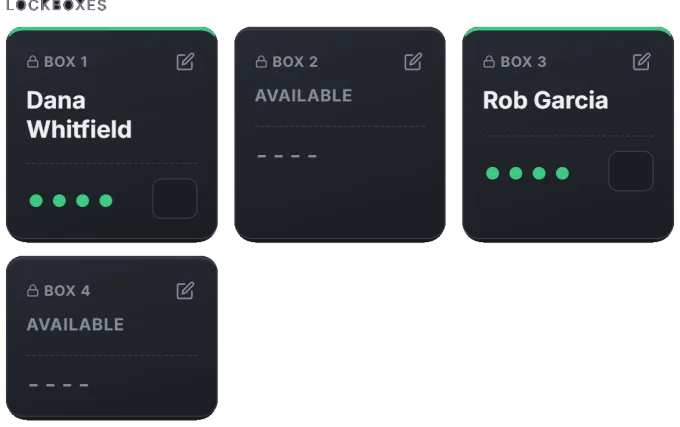
Track which key lockbox is holding whose keys, with the code hidden until you need it.
- Each lockbox shows the customer it's set aside for, or Available.
- Codes stay hidden on the wall display.
- Assign a lockbox while sending an e-signature and the customer gets the code after signing.
Connects to Electronic rental agreementsLoaner fleet & sign-out


Shop TV & phones
Put TEKTUNE on a TV in the shop, and install it on phones like an app.
- A dashboard screen turns any TV into a live wall display.
- Arrange the TV from your desk - drag blocks, show or hide them, pick light or dark - and it updates in seconds. Nobody can change it from the TV itself.
- Each person arranges their own dashboard - separately for phone and computer.
- Install it to a phone's home screen for notifications.
Connects to Task boardTEKTUNE Kiosk app
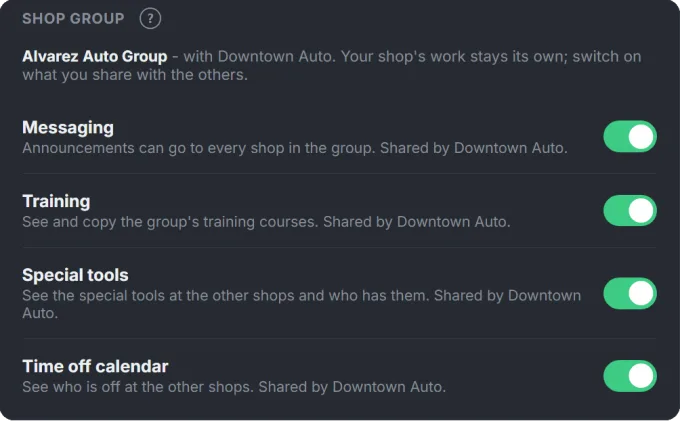
More than one shop
Own more than one location? Group them - each shop keeps its own work, and you see them all.
- Administrators open every shop in the group with one sign-in and switch between them.
- Add someone from another shop with roles of their own here.
- Each shop chooses what to share with the others: announcements, training, special tools and the time off calendar.
- Every shop keeps its own plan, data and settings.
Connects to Message CenterTrainingSpecial tool inventoryTime off

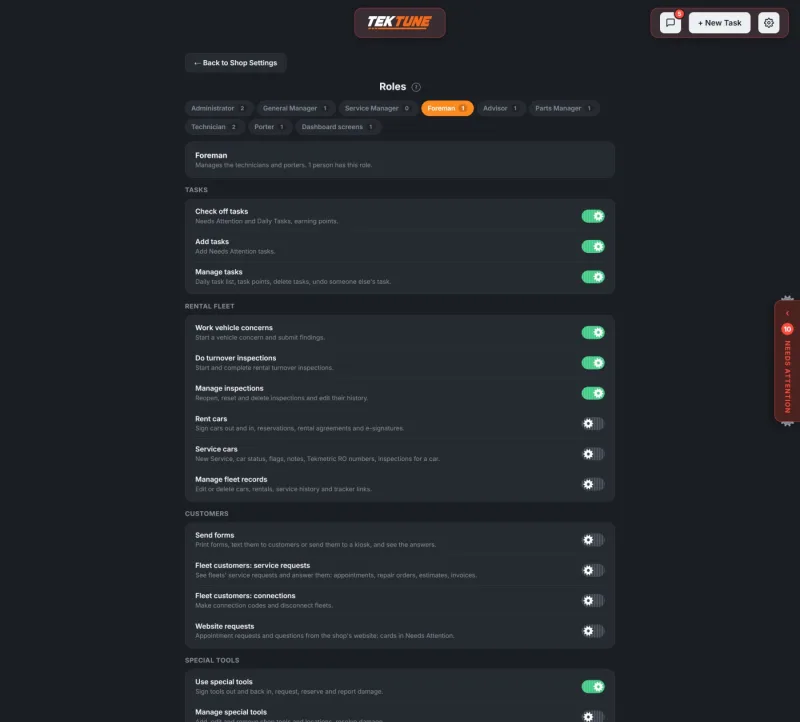
Your team, your rules
Turn on only what your shop uses, and decide who sees what.
- Roles that match your shop - Technician, Porter, Advisor, Parts Manager, Foreman, Service Manager, General Manager, Shop Contact and Administrator - and one person can have several.
- See exactly what each role can do, and change any of it. Foremen and Service Managers look after their own team's time off and time cards.
- Every part of TEKTUNE is a module. Already use something else for one of them? Turn it off - for the whole shop or one role.
- Add an employee with a name, role and email; PINs switch people in and out on shared shop computers.
Connects to Time offTime clockMore than one shop
That's the tour!
Every one of these is a module you can switch on or off - and they're built to work together. Try it in your own shop, free for 15 days.